Solano College Sign-In Experience
Need Help Signing In?
If you have trouble logging in:
- Confirm you entered your username as username@solano.edu
- Try again on the updated sign-in screen
- Contact the Solano College Technology Help Desk for assistance: (707) 864-7000 Ext: 4690. Our hours of operation are Monday - Friday: 8:00 AM to 4:30 PM
helpdesk@solano.edu
(707) 864-7000 Ext: 4690
Sign-In Help
Solano College uses a modern sign-in experience powered by Microsoft Entra to provide stronger security and a more consistent login across our college portfolio of connected applications.
You may notice that some login screens look different than before. This is expected.
What’s Changed
Updated Login Screen and Username Format
When signing in to systems such as Canvas, FalconNest, Student Self-Service, and other Solano College services, you may notice:
- A new login screen
- A different username format
When signing in, you will enter your username in this format: username@solano.edu
Important Notes
- username@solano.edu is your login username, not your email address. Use this format only when signing in to Solano College systems.
- Your account and password are the same--only the way you enter your username has changed.
Example
- If your username is llane3, you will sign in as: llane3@solano.edu
- Your account is the same — you’re just entering your username in a new format, shown in the example below.
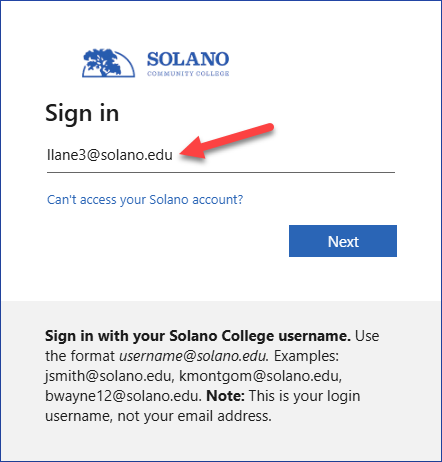 Example of the new Solano College sign-in screen using the username@solano.edu format.
New Sign-In Experience - Helpful Videos
Watch these brief videos for quick help with the updated Solano College sign-in experience, including the new username format and common sign-in prompts you may see.
Solano College Sign-In Update
Frequently Asked Questions
You now sign in using your username in the format:
username@solano.edu
Instead of entering just your username, you’ll add @solano.edu when signing in.
No. Your username is the same--you’re just entering it in a new format.
No. Your password stays the same unless you choose to reset it or are prompted to do so for security reasons.
No. This is your login username, not your email address.
Use this format only when signing in to Solano College systems.
You will see the updated sign-in screen when accessing systems such as:
- Canvas
- FalconNet
- Student Self-Service
- Other Solano College applications and services
Double-check that you entered your username in this format:
username@solano.edu
Make sure you are not using:
- A student or employee email address
- A personal email address
This message is generated by Microsoft, not Solano College. It appears when Microsoft thinks you are trying to sign in with a personal Microsoft account instead of your Solano College account.
This usually happens when @solano.edu is not included with your username. When the username format is incomplete or incorrect, Microsoft may try to match it to a personal account because Microsoft uses the same sign-in system for both personal and organizational accounts.
This message does not mean your Solano College account is compromised or has changed.
What to do:
Cancel the message and sign in again using:
username@solano.edu
Note: This verification message is not generated by Solano College.